
Swoole笔记
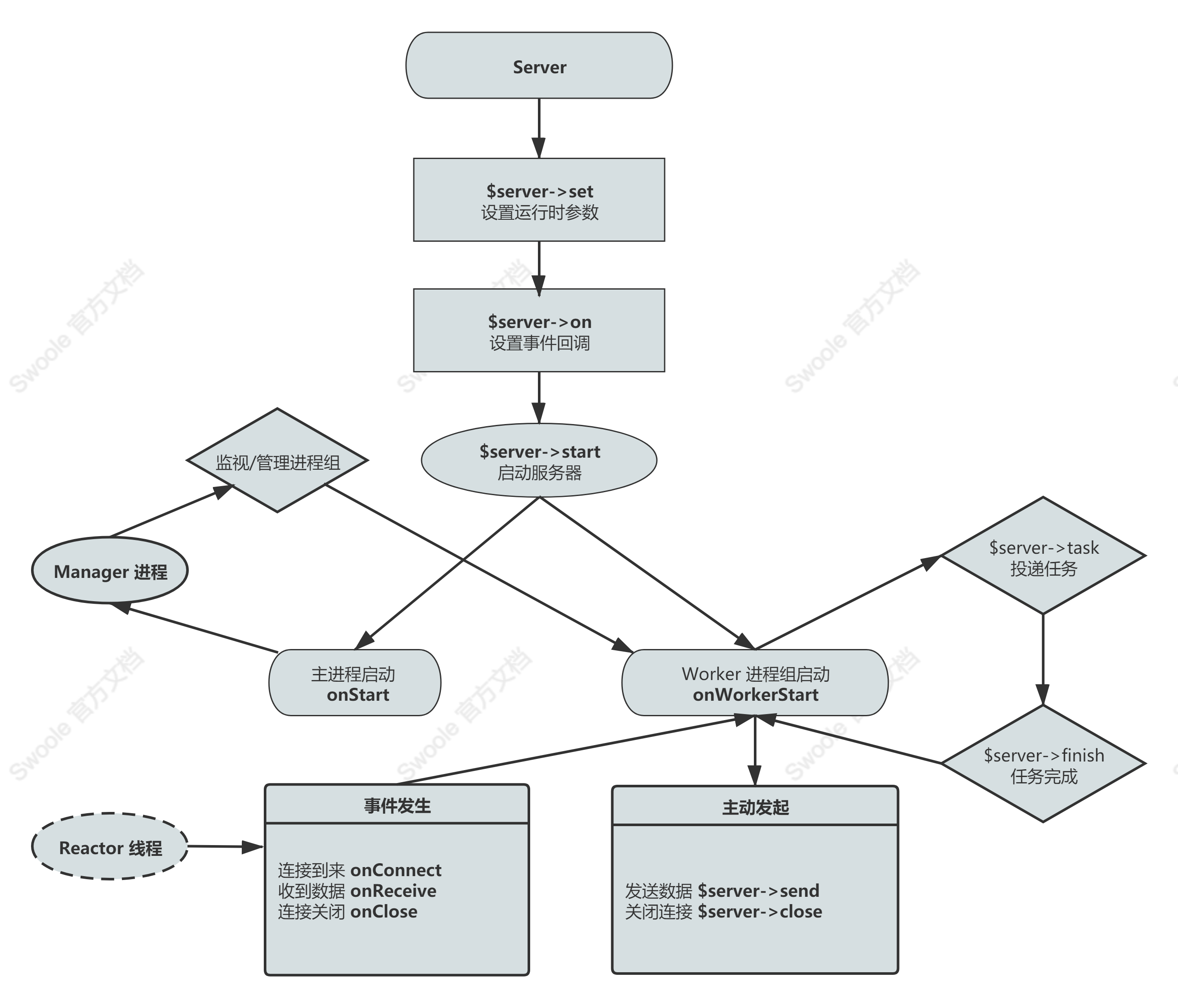
运行流程图
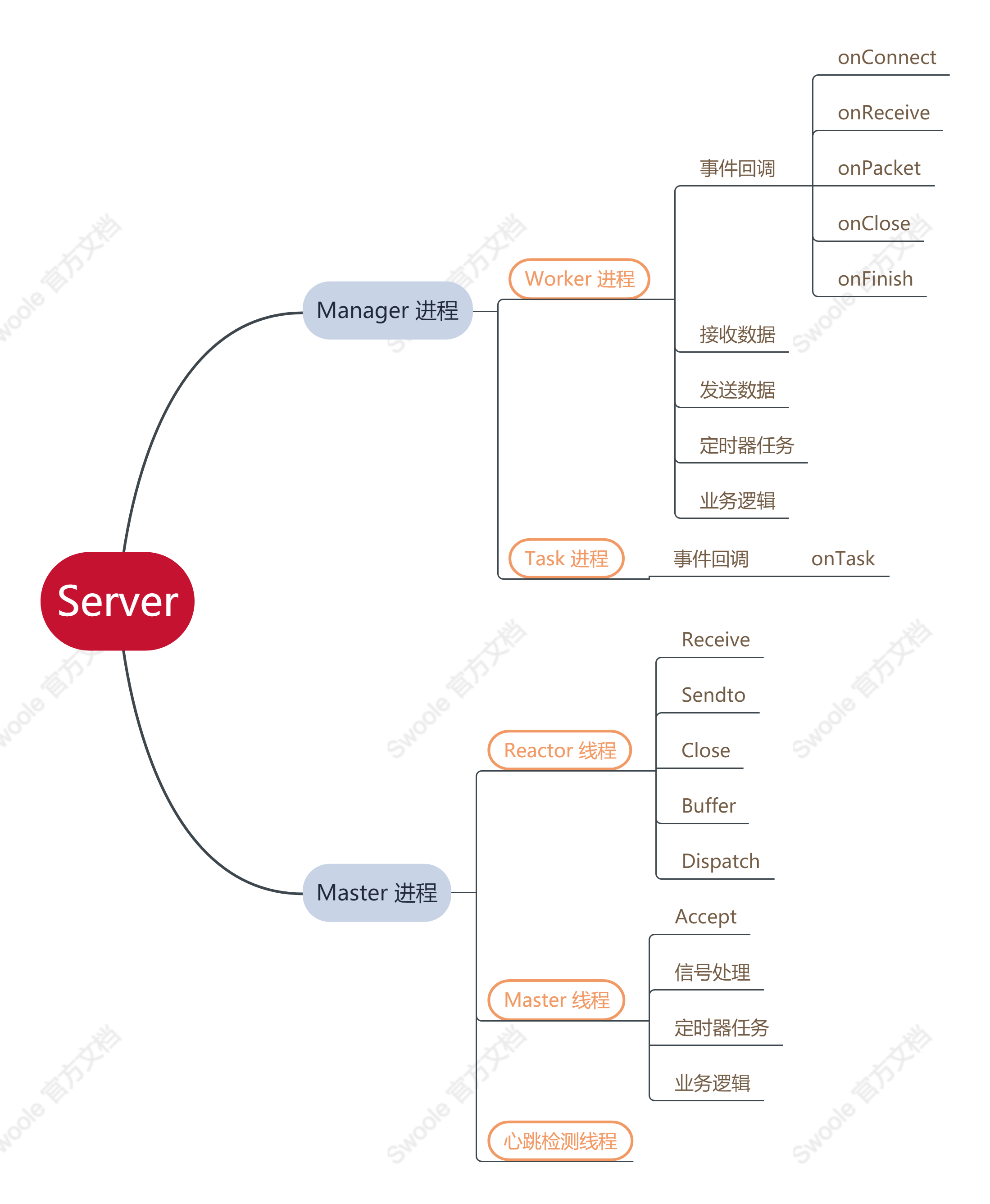
进程 / 线程结构图
swoole安装
通过 PECL 安装 Swoole:
shell
➜  ~ pecl install -D enable-openssl="yes --with-openssl-dir=/opt/homebrew/opt/openssl@3" 'enable-sockets="no" enable-http2="yes" enable-mysqlnd="no" enable-swoole-json="yes" enable-swoole-curl="yes" enable-cares="no"' swoole
➜ ~ brew services restart php【安装成功】:
shell
➜  ~ php --ri swoole

swoole

Swoole => enabled
Author => Swoole Team <team@swoole.com>
Version => 5.1.0
Built => Oct  8 2023 00:09:22
coroutine => enabled with boost asm context
kqueue => enabled
rwlock => enabled
openssl => OpenSSL 3.1.3 19 Sep 2023
dtls => enabled
http2 => enabled
json => enabled
curl-native => enabled
pcre => enabled
zlib => 1.2.12
async_redis => enabled

Directive => Local Value => Master Value
swoole.enable_coroutine => On => On
swoole.enable_library => On => On
swoole.enable_fiber_mock => Off => Off
swoole.enable_preemptive_scheduler => Off => Off
swoole.display_errors => On => On
swoole.use_shortname => On => On
swoole.unixsock_buffer_size => 262144 => 262144安装报错常见问题
缺少声明openssl安装路径
shell
/private/tmp/pear/temp/swoole/include/swoole_ssl.h:27:10: fatal error: 'openssl/ssl.h' file not found
#include <openssl/ssl.h>
         ^~~~~~~~~~~~~~~
2 errors generated.- 查看openssl的安装路径
【方法一】
shell
➜  ~ openssl version -a | grep "OPENSSLDIR"
OPENSSLDIR: "/opt/homebrew/etc/openssl@3"【方法二】
shell
➜  ~ brew --prefix openssl
/opt/homebrew/opt/openssl@3【方法三】
shell
➜  ~ openssl version -a
OpenSSL 3.1.2 1 Aug 2023 (Library: OpenSSL 3.1.2 1 Aug 2023)
built on: Tue Aug  1 13:36:55 2023 UTC
platform: darwin64-arm64-cc
options:  bn(64,64)
compiler: clang -fPIC -arch arm64 -O3 -Wall -DL_ENDIAN -DOPENSSL_PIC -D_REENTRANT -DOPENSSL_BUILDING_OPENSSL -DNDEBUG
OPENSSLDIR: "/opt/homebrew/etc/openssl@3"
ENGINESDIR: "/opt/homebrew/Cellar/openssl@3/3.1.2/lib/engines-3"
MODULESDIR: "/opt/homebrew/Cellar/openssl@3/3.1.2/lib/ossl-modules"
Seeding source: os-specific
CPUINFO: OPENSSL_armcap=0x87d- 在
pecl安装swoole时,带上参数enable-openssl="yes --with-openssl-dir=/opt/homebrew/etc/openssl@3"
解决pcre2.h not found
先安装pcre2
shell
brew install pcre2pcre软连接
shell
ln -s /opt/homebrew/Cellar/pcre2/10.45/include/pcre2.h /opt/homebrew/Cellar/php@8.3/8.3.20/include/php/ext/pcre/pcre2.h确认pcre软连接是否成功
shell
cd /opt/homebrew/Cellar/php@8.3/8.3.20/include/php/ext/pcre/
ls
pcre2.h php_pcre.htcpdump抓包
shell
➜  swoole sudo tcpdump -i lo0 host 127.0.0.1 and port 9501 -w ~/course.pcap
Password:
tcpdump: listening on lo0, link-type NULL (BSD loopback), snapshot length 524288 bytes
18 packets captured
152 packets received by filter
0 packets dropped by kernel- 使用Wireshark查看course.pcap,结果如下:

- 读取管道(如内置函数:popen、proc_open函数(双向管道,标准输入、标准输出)),就是进程之间通讯的一种方式
defer
先进后出原则(入栈,出栈),逆向(倒序)执行。
php
go(function () {
    mkdir('/tmp/tmp');
    defer(function () {
        rmdir('/tmp/tmp');
    });
    file_put_contents('/tmp/tmp/tmp.tmp', time());
    defer(function () {
        unlink('/tmp/tmp/tmp.tmp');
    });
});区分php内置函数:
register_shutdown_function()会顺序执行,把defer()改为前者,会报错。
php
go(function () {
    defer(function () {
        echo 1.PHP_EOL;
   });
    defer(function () {
        echo 2.PHP_EOL;
   });
    defer(function () {
        echo 3.PHP_EOL;
   });
});
# 输出:
3
2
1关于FPM
FPM下所有的连接都是短连接(pconnect除外),单例也是短连接!